A polished home podcast studio depends less on having the most expensive gear than on creating a quiet, repeatable recording environment. With the right room choice, practical soundproofing techniques, a simple equipment chain, and a clean visual setup, you can record audio and video that feels professional from home. This guide walks through the complete process, from planning your space to testing your workflow before you hit record.
What Does a Home Podcast Studio Really Need?
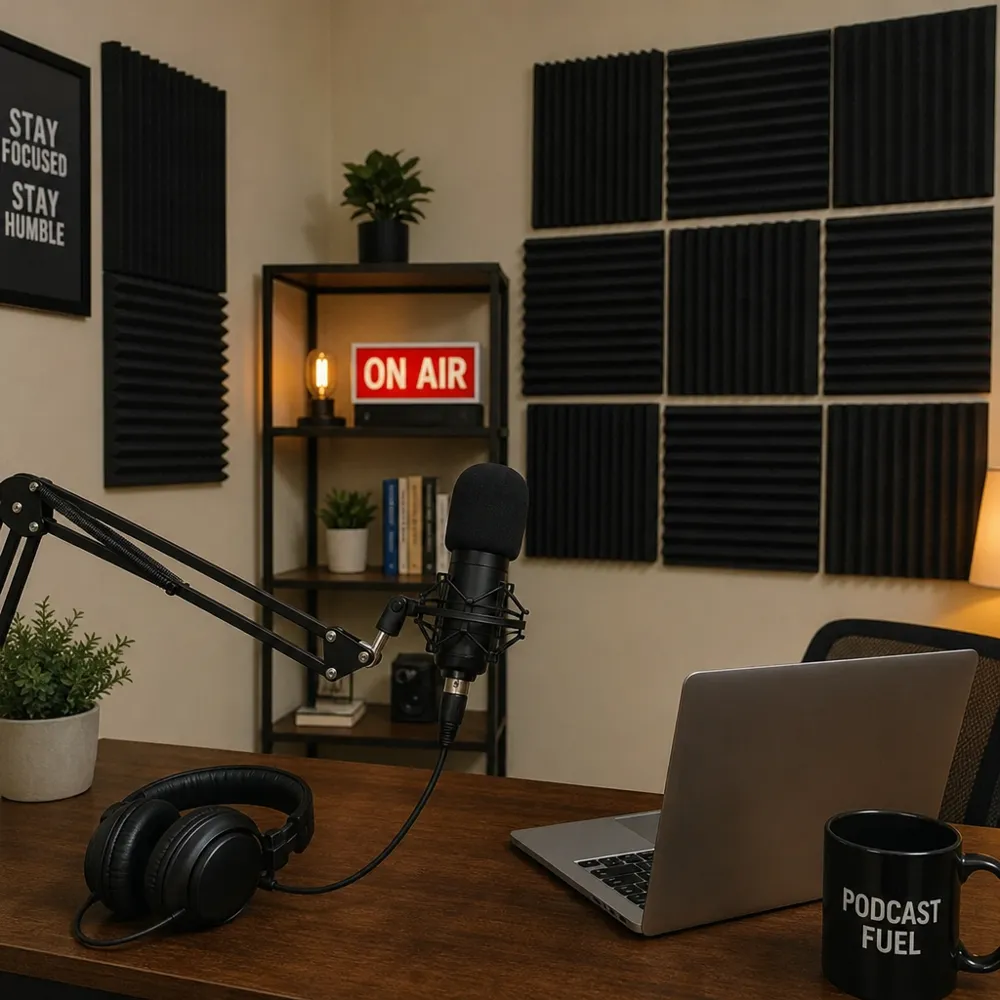
A home podcast studio needs four things: a quiet space, a microphone setup that captures your voice clearly, recording software that fits your format, and a comfortable layout you can use consistently. You do not need a commercial broadcast room to start, but you do need to reduce noise, control echo, and make your recording process easy enough to repeat every week.
Think of your setup as a system. The room affects the microphone. The microphone affects the software. The software affects how easy it is to edit, publish, and collaborate. When one part is weak, the rest of the setup has to work harder.
For many creators, the smartest approach is to start with a focused home podcast setup and improve it in stages. You can begin with a strong microphone, headphones, and a treated corner of a room, then add better lighting, camera gear, acoustic panels, or a dedicated desk as your show grows.
A strong beginner setup usually includes:
- A quiet recording area away from appliances, vents, street noise, and shared walls.
- A reliable microphone that suits your room and recording style.
- Closed-back headphones to prevent audio bleed and help you hear problems while recording.
- A stable computer or laptop for recording, uploading, and editing.
- Recording software or a remote recording platform for capturing your episode.
- Basic acoustic treatment such as rugs, curtains, foam, panels, or soft furniture.
- A clean studio background setup if you record video clips or full video episodes.
Perfection is not required. Aim for clarity, consistency, and a space that helps you focus on the conversation instead of fighting technical issues.
Step 1: Choose the Right Room Before Buying Gear
The room is the foundation of your setup. A great microphone in a noisy, reflective room can sound worse than a modest microphone in a well-chosen space. Before you spend money on new equipment, walk through your home and listen carefully.
Choose the quietest room you can reasonably use. Bedrooms, walk-in closets, carpeted offices, and rooms with bookshelves or upholstered furniture often work well because soft surfaces absorb reflections. Empty rooms, kitchens, garages, and spaces with tile or hardwood floors often create more echo.
When evaluating a room, pay attention to both outside noise and inside noise. Outside noise includes traffic, neighbors, construction, sirens, lawn equipment, and barking dogs. Inside noise includes air conditioning, refrigerators, computer fans, plumbing, washing machines, and people moving through the house.
Use this quick room test:
- Stand in the room and stay silent for one minute. Listen for hums, buzzes, footsteps, vents, or outdoor noise.
- Clap once and listen to the decay. A sharp, ringing echo means the room needs more treatment.
- Record a 30-second voice memo. Speak at your normal podcast volume, then listen through headphones.
- Test at different times of day. A room that is quiet in the morning may be noisy during rush hour or evening activity.
- Check your internet connection. Remote interviews need stable upload and download performance.
If you do not have a dedicated room, choose a repeatable corner. A desk facing a curtain, a closet with clothes, or a corner with bookshelves can work well. The best home studio is the one you can set up quickly and use without constant rearranging.
Step 2: Plan Your Podcast Studio Layout
A good studio layout makes recording feel natural. You should be able to sit comfortably, reach your controls, see your notes, monitor your levels, and stay centered on camera if you record video. This is where practical studio design ideas matter as much as equipment.
Start with your microphone position. For most home podcast setups, the microphone should be close enough to capture a strong voice signal without forcing you to lean forward awkwardly. A boom arm can help keep the microphone steady while freeing desk space. If you use a stand, place it where bumps and keyboard vibrations are less likely to travel into the recording.
Next, plan your screen and notes. If you record solo, you may want a laptop directly in front of you. If you record interviews, keep your recording platform, guest video, show outline, and audio meters visible. Avoid placing your keyboard where typing will be loud during the episode.
For video, consider how the frame looks. Your camera should usually sit near eye level, with your face well lit and your background intentional but not distracting. A simple shelf, plant, lamp, framed art, or branded element can make a home studio feel polished without turning the room into a set.
Useful layout principles include:
- Keep the microphone close and the room noise far away. The closer your voice is to the mic, the less your room dominates the recording.
- Face soft surfaces when possible. Speaking toward curtains, shelves, or panels can reduce reflections.
- Avoid bare walls directly behind or in front of the microphone. These surfaces can bounce sound back into the recording.
- Create a cable path. Route cables behind the desk or along the wall so they do not tangle or pull during recording.
- Leave space for gestures and posture. Comfort helps you sound more relaxed and confident.
A simple layout beats a complex one if it makes recording easier. The more friction you remove from your setup, the more likely you are to record consistently.
Step 3: Select the Right Microphone for Your Space
The microphone is usually the first piece of gear people think about when learning how to set up a podcast studio, but it should match the room, not just your budget or favorite creator’s setup. In a typical home environment, a dynamic microphone is often easier to manage because it tends to pick up less room sound than many highly sensitive condenser microphones. Condenser microphones can sound detailed, but they may also reveal echo, computer fans, and background noise if the space is untreated.
USB microphones are convenient because they plug directly into your computer. They are a good choice for solo creators, beginners, and simple home podcast setup workflows. XLR microphones require an audio interface or mixer, but they offer more flexibility if you plan to use multiple microphones, upgrade components, or build a more permanent setup.
USB Microphones
A USB microphone keeps the signal chain simple. You plug it in, choose it as your input, set your recording level, and start. This can be ideal when your show is mostly solo commentary, remote interviews, or video content where speed matters.
The tradeoff is that USB setups can become less convenient when you add multiple local hosts. Some software may not handle several USB microphones smoothly at once. If your show will have two or more people in the same room, think carefully before buying several USB mics.
XLR Microphones
An XLR microphone connects to an audio interface, mixer, or recorder. This adds cost and complexity, but it gives you more control over gain, monitoring, and multi-mic recording. XLR is often a better path if you want your setup to grow over time.
For a home studio, pair the microphone with a sturdy boom arm or stand, a pop filter or foam windscreen, and shock isolation if desk movement is a problem. These accessories do not replace good mic technique, but they help reduce plosives, vibrations, and inconsistent positioning.
Step 4: Build a Clean Recording Chain
Your recording chain is the path your voice takes from microphone to final file. A simple, reliable chain is better than a complicated one you do not fully understand. The fewer unnecessary steps you add, the easier it is to troubleshoot.
A basic recording chain might look like this:
- Microphone captures your voice.
- Cable or USB connection carries the signal.
- Audio interface or computer input converts and receives the signal.
- Recording platform or software captures the audio and video.
- Headphones let you monitor your voice, guests, and playback.
- Editing software helps you clean up and prepare the episode.
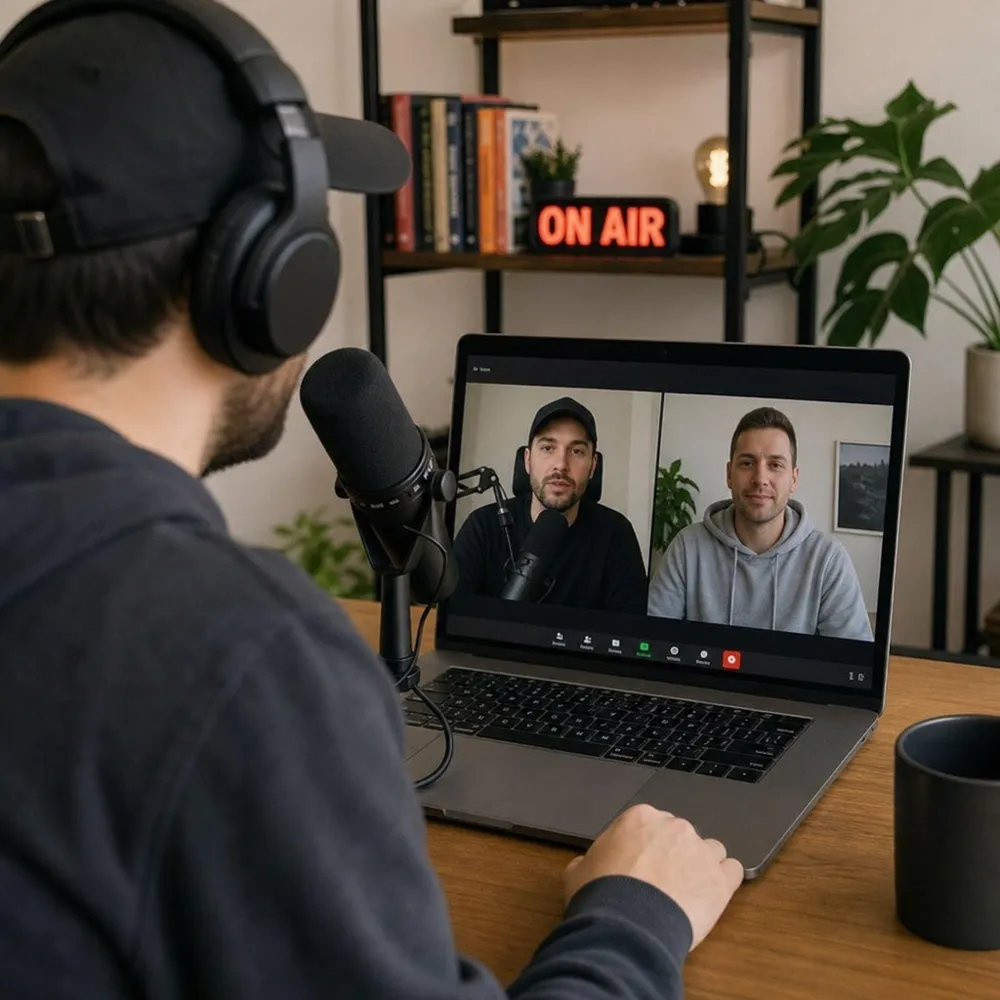
If you record remote guests, the platform becomes especially important. Zencastr is a remote podcast and video recording platform that helps creators record conversations with people who are not in the same room. Instead of relying only on a standard live call, a remote recording service is designed around capturing podcast and video content for later production.
This matters because many home podcasters interview guests, co-host with someone in another city, or record video clips for social channels. A platform like Zencastr can fit into a home studio by giving you a place to record remote audio and video sessions while you manage your microphone, camera, and headphones from your own space. You can learn more at zencastr.com, and if remote interviews are part of your show, try Zencastr free as you build your workflow.
Step 5: Use Soundproofing Techniques and Acoustic Treatment Wisely
Soundproofing and acoustic treatment are related, but they are not the same. Soundproofing techniques aim to reduce noise entering or leaving the room. Acoustic treatment improves how sound behaves inside the room by reducing echo, flutter, and harsh reflections. Most home studios need more acoustic treatment than true construction-level soundproofing.
If you are recording in a typical home, start with the practical fixes first. Seal gaps, reduce hard surfaces, move away from noise sources, and add soft materials around the recording area. These steps are often more realistic than rebuilding walls or installing specialized doors.
Practical Soundproofing Techniques
True soundproofing usually requires mass, isolation, and airtight sealing. That can involve construction, which may not be possible in a rental or shared home. Still, there are simple improvements that can reduce everyday noise.
Try these practical steps:
- Seal door gaps with weatherstripping or a draft stopper.
- Close windows and cover them with thick curtains.
- Turn off noisy appliances during recording when safe and practical.
- Record away from shared walls when neighbors, roommates, or family members are active.
- Use rugs or carpet to reduce floor reflections and footstep noise.
- Place dense furniture such as bookshelves along reflective walls.
- Schedule recording sessions during quieter parts of the day.
These steps will not make a loud room silent, but they can lower the noise floor enough for cleaner recordings.
Acoustic Treatment for Clearer Speech
Acoustic treatment is often the fastest way to improve a home podcast setup. Speech becomes easier to understand when the microphone captures less room bounce. You are not trying to make the room feel dead, only to reduce distracting reflections.
Focus on the areas closest to your recording position. A rug under the desk, curtains behind the microphone, and absorptive panels at reflection points can make a noticeable difference. If you use foam, place it strategically rather than covering random patches of wall. Thick, dense materials generally help more than thin decorative pieces.
Closets can work because clothing absorbs reflections, but they can also sound boxy if the space is too small. If you record in a closet, test different microphone positions and avoid pressing your face into a wall of fabric. Give your voice a little space while keeping reflective surfaces under control.
How Should Your Podcast Studio Background Setup Look on Video?
Your studio background setup should support your show’s tone without distracting from your face, voice, or guest. For video podcasts, the background is part of the viewer’s first impression. It does not need to be elaborate, but it should look intentional, tidy, and consistent with your topic.
Start by deciding what the background should communicate. A business podcast may benefit from a clean office look. A creative show may use color, shelves, instruments, art, or warm lighting. A personal brand show may include a few objects that hint at your work, interests, or point of view.
Keep depth in mind. Sitting directly against a wall can make the frame feel flat and can create shadows. If possible, leave some space between you and the background. This creates a more natural look and gives you room to use lighting creatively.
Strong studio background setup ideas include:
- A simple bookshelf with a few carefully chosen objects.
- A plant and lamp combination for warmth and depth.
- Acoustic panels arranged neatly so treatment also becomes design.
- A clean desk background with minimal clutter.
- A branded sign or subtle logo if the show belongs to a company or creator brand.
- A curtain backdrop for a soft, controlled visual field.
- Colored accent lights used sparingly to separate you from the background.
Avoid visual noise. Piles of papers, open closet doors, messy cables, and random household items can make the episode feel less prepared. If you cannot redesign the room, use framing to your advantage. A slight camera angle adjustment may hide clutter and reveal a cleaner section of the space.
Step 6: Set up Lighting and Camera for Video Podcasts
Video is increasingly common in podcasting because one recording session can support full episodes, clips, reels, and promotional content. A thoughtful camera and lighting setup helps your content feel more professional even if your studio is small. The most important rule is simple: make your face easy to see.
Natural light can look good, but it changes throughout the day. If you rely on a window, test how the image looks at your normal recording time. Avoid sitting with a bright window directly behind you unless you can control exposure, because your face may appear dark.
A basic lighting setup can include:
- Key light: The main light on your face, placed slightly above eye level and off to one side.
- Fill light: A softer light or reflected light that reduces harsh shadows.
- Background light: A lamp, accent light, or small practical light that adds depth behind you.
You do not need all three on day one. A single soft light placed well can outperform several harsh lights placed poorly. If you wear glasses, adjust the angle of the light to reduce reflections.
For cameras, start with what you already have if it looks good enough. Many creators begin with a webcam or smartphone before upgrading. Whatever camera you use, position it at or slightly above eye level, clean the lens, and check your framing before recording. Your eyes should be near the upper third of the frame, with enough headroom to look natural.
Step 7: Configure Your Recording Software
Recording software should match your format. A solo show, local co-hosted show, remote interview, and video podcast all have different needs. Do not choose software only because it has the most features; choose the tool that makes your actual recording process stable and understandable.
Before recording a full episode, configure the basics:
- Select the correct microphone and camera. Do not assume the software automatically chose your best devices.
- Set input levels. Aim for a strong signal without clipping or distortion.
- Use headphones. This reduces echo and helps you catch problems early.
- Record a short test. Listen and watch before inviting a guest or recording the real episode.
- Check storage and power. Make sure your device has enough space and battery or is plugged in.
- Close unnecessary apps. This helps reduce notifications, fan noise, and performance issues.
If you record remote interviews, send guests simple setup instructions. Ask them to use headphones, choose a quiet room, silence notifications, and position their microphone or laptop close enough for clear speech. A guest does not need a full studio to sound better; small changes can make a big difference.
Zencastr can be part of this workflow when you need a remote podcast and video recording platform for guest conversations. It gives creators a purpose-built place to record remote sessions, which is useful when your show depends on interviews, co-hosts, or video conversations outside your home studio.
Step 8: Test Your Setup Before Every Episode
Testing is the habit that separates a dependable studio from a fragile one. Even if your setup worked yesterday, software updates, cable movement, room noise, or changed settings can create problems. A five-minute test can save an entire episode.
Use a pre-recording checklist:
- Room: Doors and windows closed, noisy devices off, pets and household members accounted for.
- Microphone: Correct input selected, stable position, pop filter in place, cable secure.
- Headphones: Connected, comfortable, and set to a safe listening level.
- Camera: Lens clean, framing checked, background tidy.
- Lighting: Face visible, reflections controlled, background not too bright.
- Software: Correct project or session open, audio and video sources selected.
- Internet: Connection stable, especially for remote recordings.
- Notifications: Phone and computer alerts silenced.
- Backup plan: Know what you will do if a guest has audio trouble or a file fails.
Record a short sample and listen on headphones. Check for hum, clipping, echo, mouth noise, keyboard clicks, and chair squeaks. Watch the video sample for focus, exposure, distracting background movement, and sync issues. Make adjustments before the real conversation begins.
Step 9: Improve Your Workflow for Repeatable Production
A studio is not only a physical space. It is also a repeatable workflow that helps you move from idea to recorded episode without confusion. The more consistent your process, the easier it becomes to maintain quality.
Create a simple production routine. Keep your microphone position, software settings, camera framing, and lighting placement as consistent as possible. If you have to rebuild the setup each time, take photos of your desk, camera height, light position, and background so you can recreate it quickly.
Build templates where you can. Use a show outline template for introductions, key questions, sponsor notes if relevant, calls to action, and closing remarks. Use file naming conventions so recordings, edits, exports, and show notes are easy to find later. Keep a folder for music, graphics, episode art, and recurring assets.
A practical home podcast production flow might look like this:
- Plan the episode. Define the topic, guest, angle, and main takeaway.
- Prepare the space. Tidy the background, set lighting, and reduce noise.
- Open the recording platform. Confirm audio, video, and session settings.
- Record a test. Listen and watch before starting the episode.
- Record the episode. Stay close to the mic and monitor for issues.
- Save and organize files. Use consistent names and backup important recordings.
- Edit and review. Remove distractions, balance levels, and check the final export.
- Publish and repurpose. Create clips, captions, summaries, and promotional assets.
This workflow turns your setup into a reliable content system instead of a one-time equipment project.
Common Home Podcast Studio Mistakes to Avoid
Many recording problems come from small choices that are easy to fix. The most common mistake is buying more gear before solving the room. Echo, background noise, and poor mic technique cannot be fully repaired by an expensive microphone.
Another mistake is recording too far from the microphone. When you sit too far back, the mic captures more room sound and less direct voice. Move closer, lower the input gain if needed, and speak consistently across the episode.
Watch out for these issues:
- Recording in a bare room with hard walls, hard floors, and no soft materials.
- Using speakers instead of headphones, which can create echo and feedback.
- Ignoring gain levels until the audio is distorted or too quiet.
- Letting the microphone block your face in video episodes.
- Changing the setup every time, which makes quality inconsistent.
- Overdecorating the background until it distracts from the conversation.
- Skipping guest instructions before remote interviews.
- Failing to record a test file before the real episode.
The fix is usually discipline, not complexity. Treat your recording session like a small production. Prepare the room, check the signal, guide the guest, and record with intention.
Budget-friendly Podcast Studio Setup Ideas
You can build a useful home studio in phases. Start with the pieces that improve recording quality most directly, then add visual polish and convenience upgrades. This keeps your spending tied to real needs rather than impulse purchases.
For a lean setup, focus on a quiet room, a solid microphone, headphones, and basic acoustic treatment. Use a desk lamp or window light if your video needs are simple. Add a clean background using items you already own, such as books, plants, art, curtains, or a tidy shelf.
For a more developed setup, add a boom arm, audio interface, dedicated lighting, webcam or camera, acoustic panels, cable management, and a consistent recording desk. If your show involves remote guests, make your recording platform a core part of the setup rather than an afterthought.
Here are three practical setup levels:
Simple starter
- Best for: Solo shows and early interviews
- Focus: Quiet space, USB mic, headphones, basic soft furnishings
Creator upgrade
- Best for: Regular audio and video publishing
- Focus: Better lighting, improved background, boom arm, acoustic panels
Dedicated studio
- Best for: Frequent recording and multi-format content
- Focus: Permanent desk, XLR chain, treated room, remote recording workflow
The best setup is the one that supports your publishing schedule. If a purchase does not make your show easier to record, easier to watch, or easier to hear, it can probably wait.
How Do You Know When Your Podcast Studio Setup is Ready?
Your studio setup is ready when you can record a test episode with clear speech, minimal distractions, stable video if needed, and a workflow you understand. It does not have to look like a professional studio on day one. It has to let listeners focus on the conversation without being pulled out by noise, echo, distortion, or visual clutter.
A ready studio passes three tests. First, your voice sounds present and intelligible through headphones. Second, the room noise is low enough that it does not compete with your words. Third, you can set up, record, save, and find your files without confusion.
Before launching or upgrading your show, record a full practice episode. Do not just record ten seconds and assume everything works. Speak at your real volume, move naturally, check your notes, switch between host and guest if relevant, and review the file afterward. You will catch issues that only appear during a realistic session.
Final Setup Checklist
Use this checklist when building or refining your home studio:
- Choose the quietest available room or corner.
- Reduce reflections with rugs, curtains, furniture, or acoustic panels.
- Use practical soundproofing techniques such as sealing gaps and controlling noise sources.
- Select a microphone that fits your room and format.
- Wear closed-back headphones while recording.
- Place the microphone close enough for a strong, clear voice signal.
- Keep your camera at eye level for video podcasts.
- Create a clean, intentional studio background setup.
- Use soft, flattering light on your face.
- Test audio and video before every episode.
- Give remote guests simple preparation instructions.
- Use a recording workflow you can repeat consistently.
- Organize and back up your files after recording.
Setting up a home studio is a process of reducing friction. Each improvement should make your show clearer, easier to record, or more enjoyable to watch. Start with the room, build a dependable audio chain, shape the background for video, and choose tools that support the way you actually create.
If your podcast includes remote interviews or video conversations, Zencastr can help you record from wherever your guests are. Visit zencastr.com to explore Zencastr as a remote podcast and video recording platform, and try Zencastr free when you are ready to bring your home podcast setup to life.