A host is someone who welcomes people, presents a programme, or guides an audience through an experience. In technology, the word can also refer to a service that supports a website. If you searched for "host meaning in Hindi," the right interpretation depends on the context. This English-language explanation helps Hindi-speaking listeners and creators understand those meanings, then explores podcast hosting and remote interviews with Zencastr.
What Does Host Mean for Hindi-Speaking Audiences?
For Hindi-speaking audiences, "host" can describe a person receiving guests, an event presenter, a TV or podcast presenter, or an internet hosting provider. No single explanation fits every sentence. The Cambridge English–Hindi dictionary translates a host who has guests as मेज़बान (mezbaan), and a person who introduces guests and performers on television or radio as परिचारक (paricharak). To understand the meaning in a given sentence, first identify whether it concerns hospitality, presenting, or technology.
Here is how those common meanings differ:
- Home or social gathering
- What the host does: welcomes and looks after visitors
- Example: someone inviting friends to dinner
- Live event
- What the host does: introduces speakers or performers and guides proceedings
- Example: a presenter leading a college programme
- TV or podcast
- What the host does: presents the show and introduces or interviews guests
- Example: someone leading an interview episode
- Web hosting
- What the host does: provides the technical service that makes a website accessible online
- Example: a provider hosting a business website
These uses share the same spelling but describe different responsibilities. A web host is not the person speaking into a microphone, while an event host may present a programme without owning or producing it. The surrounding words reveal which meaning applies.
When you see "host" in an episode description, think first of the presenter. If you see it while setting up a website, think of infrastructure rather than a person. That distinction is especially useful when moving between creative and technical podcasting tasks.
What Does a Podcast Host Actually Do?
A podcast host presents an episode, introduces its subject, and guides the listener through the discussion. Dictionary.com's definition of host covers a moderator or interviewer for a television or radio program or podcast. In an interview, the host asks questions and helps the guest explain their ideas. The role centres on making the conversation understandable and worth following, rather than simply being the person who speaks most.
To put that role into practice, organise your work around three stages:
- Before recording: Define the episode's purpose, research the guest, and prepare questions that serve the audience.
- During recording: Introduce the topic, listen carefully, ask useful follow-ups, and keep the conversation moving without rushing it.
- After recording: Review unclear passages, check names and references, and identify anything that needs clarification before publication.
For example, imagine interviewing a small-business owner for listeners in India. Instead of opening with a broad request to describe their entire journey, begin with one concrete turning point. Then explore what happened, what decision they made, and what listeners can learn from it.
Keep asking yourself whether someone hearing this subject for the first time could follow the answer. If not, request an example or briefly explain the missing context. Treat clarity as your responsibility, even when your guest knows the subject better than you do.
Podcaster Meaning Goes Beyond Presenting
A podcaster is someone who makes podcasts. If you are searching for "podcaster meaning in Hindi," the simplest English explanation is a podcast creator. "Podcast host" emphasises presenting, while "podcaster" can describe the broader creative work involved in making the show. Our explainer on the podcast meaning in Hindi covers the format itself.
On your own show, you might combine presenting with topic planning, recording, editing, writing descriptions, and publishing. On a team, divide those tasks explicitly rather than assuming the host handles everything. Decide who checks the finished episode, who prepares promotional material, and who approves publication.
For a first project, keep that division manageable. Write down the essential jobs and assign a name to each one, even if your own name appears repeatedly. This turns the broad ambition of becoming a podcaster into a practical production plan.
Host, Co-Host, and Guest Are Different Roles
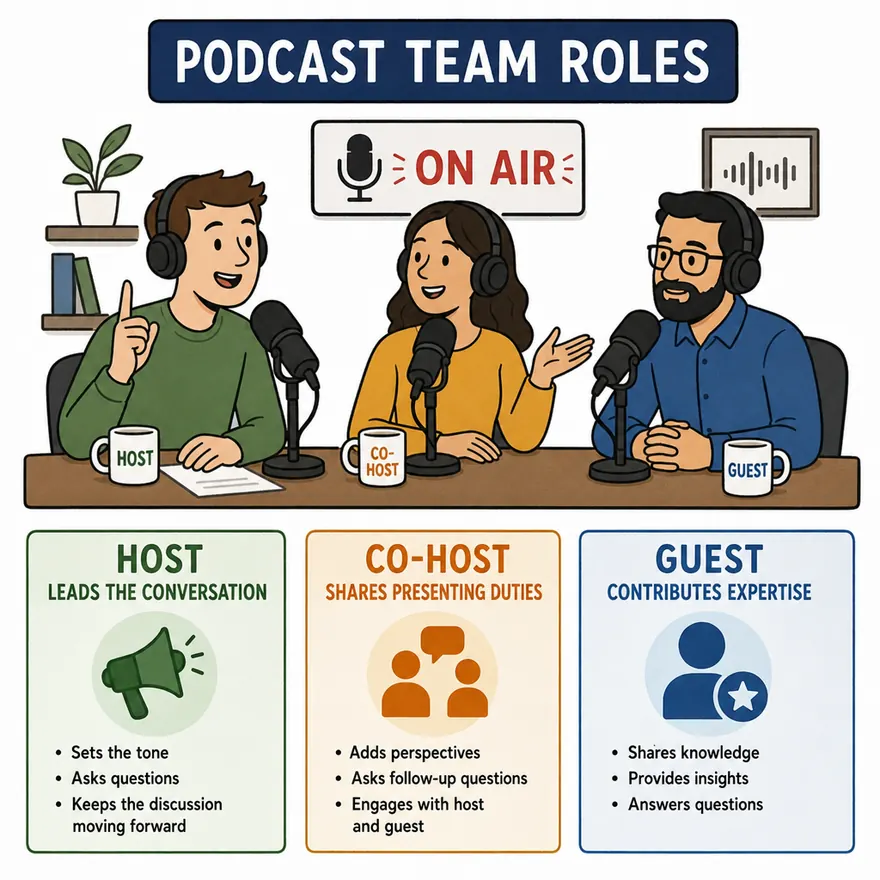
A host leads the programme, a co-host shares presenting duties, and a guest is invited to contribute to it. A co-host is therefore a fellow presenter, not simply another person appearing in the recording. A guest contributes to the discussion without automatically taking responsibility for running the show.
For an interview format, try this division:
- Host: Opens the episode, introduces the guest, handles transitions, and closes the discussion.
- Co-host: Adds another perspective, asks follow-up questions, and helps steer the conversation toward the episode's purpose.
- Guest: Shares relevant knowledge, experiences, or opinions in response to the discussion.
Agree on those responsibilities before recording. For instance, let one presenter handle the opening questions while the other watches for unexplained terminology. Avoid having both presenters jump in whenever the guest pauses.
You can also invite someone to serve as a guest co-host, but explain that arrangement clearly. Give them a presenting responsibility rather than leaving them unsure whether to ask questions or wait to answer them.
Skills to Practise as a Podcast Host for Hindi Listeners
Build your preparation around the listeners you want to reach, not an imagined ideal broadcaster. Choose a conversational style that suits your subject and practise explaining ideas without unnecessary complexity. These exercises make that goal concrete.
Practise clear explanations. Record a short introduction to your topic and listen back without looking at your notes. Check whether you explain specialist words before relying on them. If your intended audience includes beginners, choose familiar examples rather than assuming shared professional knowledge.
Listen for the next useful question. Prepare a question list, but do not treat it as a script you must finish. When a guest mentions a difficult choice, ask what alternatives they considered. When an answer stays abstract, request a specific incident. Our list of podcast interview questions can help you build that list.
Make deliberate language choices. Before an interview, agree on the language and level of terminology that suit your audience. If you plan to switch between Hindi and English during the recording, decide when that will help listeners. Avoid switching merely because a prepared question uses unfamiliar wording.
Protect the listener's understanding. Ask guests to explain references that may be unfamiliar outside their city, profession, or community. Do not assume every listener in India shares the same background. Give enough context for someone new to the conversation to stay involved.
Practise respectful direction. Rehearse a polite transition for answers that drift away from the topic. Try acknowledging the point, then connecting it to your next question. Before recording, also agree on subjects the guest would prefer not to discuss.
How Can You Host Remote Interviews With Zencastr?
You can use Zencastr to create a recording session, invite a remote guest, check your equipment, and record the interview together. Guests can join through an invitation link without creating a Zencastr account. The platform records participants on separate tracks, giving you individual recordings to work with afterward.
Use this workflow for your first interview:
- Prepare the conversation. Send the topic, intended audience, approximate duration, and preferred interview language. Specify the meeting time in Indian Standard Time, particularly when guests are joining from other countries.
- Create the session and invite your guest. Set up your recording in Zencastr, choose the appropriate recording mode, and send an email invitation or copy the invite link. Share it privately rather than posting it publicly.
- Check the setup before starting. Review microphone selection and ask everyone to use headphones, which Zencastr recommends to help prevent echo and audio bleed. Make a short practice recording before committing to the interview.
- Lead with a clear opening. Confirm that everyone is ready to be recorded, introduce the guest, and explain the episode's focus. Leave space between questions and answers instead of filling every pause.
- Finish the uploads before leaving. After stopping the recording, stay in the room until all participant tracks have uploaded. Ask your guest to remain too, because closing the tab early can interrupt the upload process.
Zencastr records tracks locally and backs them up to the cloud as you record. Still, plan for a quiet space and a reliable connection rather than treating the software as a replacement for preparation. Our guide on how to record a podcast remotely covers the rest of the setup.
Put the Role Into Practice
Start with one focused topic, one guest, and a short question outline. Practise making the introduction clear, following an interesting answer, and closing with a useful takeaway. Review the recording for those three things before adding more complexity.
Ready to practise? Try Zencastr and record a remote conversation with someone whose experience your listeners would find useful.